1) The circuit that had been constructed based on Cytron website.
Conclusion: It can be seen that the vibration sensor is function when gives an impact to it. The LED on when the vibration sensor is vibrate. The vibration does not have any polarity so it easy to get use of it.
1) To construct circuit of temperature sensor and display the value on the LCD.
2) To build a program using C++ language
Method:
1) using Proteus 7 Professional software to construct circuit
2) using KeilVision4 to write the program
The program has been written and compiled. The HEX file is loaded to the circuit. The simulation is running to demonstrate the system operation. Below is the circuit which had been running the program:
When the temperature is at high, the temperature value is increase and vice versa. The program need to be adjusted as I just tried by myself to do this program besides refer to notes and websites.
Conclusion:
This week I learn how to do the program for temperature sensor which linked with the LCD display. I learned that the program need to start by declared the input pins that had been used in the circuit. To display the value on the LCD display, we need to do HEX value to ASCII code conversion and then do the conversion of the DEC to ASCII.
1) using Proteus 7 Professional software to construct circuit
2) using KeilVision4 to write the program
The program has been written and compiled. The HEX file is loaded to the circuit. The simulation is running to demonstrate the system operation. Below is the circuit which had been running the program:
Conclusion:
This week I learn how to do the program for LCD display. I learned that the program need to start by declared the input pins that had been used in the circuit. To display the word or character on the LCD display, we need to know the position of the character based on the LCD command codes table. The LCD pins also plays an important because if it not connects well to the microcontroller, it will not display the word on the LCD.
For this semester, the hardware material of this project need to buy to implement this project. Firstly, we need to find the hardware materials and compare the prices to buy it. The project materials are:
Microntroller AT89S52
Vibration sensor
Alcohol sensor
Pressure sensor
Temperature sensor
LCD Display
GSM Module
GPS Module
ADC 0809
RF Module
Helmet
The budget for this hardware material is at around RM500. So, these are the budget of each components that had been searched below:
No.
Item
Price (RM)
1
Microcontroller
AT89S52
10
2
Vibration Sensor
20
3
Alcohol Sensor
22
4
Pressure Sensor
90
5
Temperature Sensor
4
6
LCD Display
12
7
GSM
65
8
GPS
120
9
ADC 0809
17
10
RF MODULE
46
TOTAL
406
As for me, I hope the project budget is not overlapped and I hope all these should be enough to implement my project. I will be continue to do this blog as it is my log book which can be as my reference when doing this project.
Objective:
1) Preparation of Presentation Day
2) Preparation of Proposal Report
Method:
1) By making research in the internet This week I will show about my proposal presentation and proposal report that will need to be assessed.
The motorcycle do not start if the rider violated the rules when wearing the helmet
The work plan for Final Year Project 1
The work plan for Final Year Project 2
References for research articles
The work plan is put in the proposal so that I can plan my work for this semester and the next semester. The improvise section shows that I need to do more researches about my project so that I can analyzed the outcome of this project. I hope I can manage to design this project.
A liquid-crystal display (LCD) is a flat panel display, electronic visual display, or video display that uses the light modulating properties of liquid crystals. Liquid crystals do not emit light directly. LCDs are available to display arbitrary images or fixed images with low information content which can be displayed or hidden such as preset words, digits and 7-segment displays as in a digital clock. they use the same basic technology except that arbitrary images are mafe up of a larger number of small pixels while other displays have larger elements.
There are important factors to consider when evaluating an LCD:
Resolution vs. Range: Fundamentally resolution is the granularity with which a performance feature of the display divided. Resolution is often confused with range or the total end-to-end output of the display. Each of the major features of a display has both a resolution and a range that are tied to each other but very different. Frequently the range is an inherent limitation of the display while the resolution is a function of the electronics that make the display work.
Spatial performance: LCDs come in only one size for a variety of applications and a variety of resolutions within each of those applications. LCD spatial performance is also sometimes described in terms of the diagonal distance from one corner to its opposite. The spatial resolution of an LCD is expressed by the number of columns and rows of pixels.
Temporal/timing performance: As compared to spatial performance, temporal performance is a feature where smaller is better. The range is the pixel response time of an LCD or how quickly a sub-pixel's brightness changes from one level to another. REfresh rate or the temporal resolution of an LCD is the number of times per second in which the display draws the data is being given. Since activated LCD pixels do not flash on/off between frames.
Color performance: Color performance include color gamut which is the range of colors that can be displayed and color depth which is the color resolution or the resolution or fineness with which the color range is divided.
LCD display applications:
Computer monitors
Televisions
Instrument panels
Aircraft cockpit displays
Signage
DVD players
Clocks
Watches
Calculators
Telephones
Gaming devices
For this project, the LCD display that will used is 16x2 LCD display. This LCD display is much more informative output device than a single LED. The LCD is a display that can easily show characters on its screen. They have a couple of lines to large displays. Some LCDs are specifically designed for specific applications to display graphic images. These modules are replacing 7-segments and other multi-segment LEDs. LCD can be easily interfaced with microcontroller to display a message or status of the device. It can be operated in two modes: 4-bit mode and 8-bit mode. This LCD has two registers namely command register and data register. It is having three selection lines and 8 data lines. By connecting the three selection lines and data lines with the microcontroller, the messages can be displayed on LCD.
LCD display
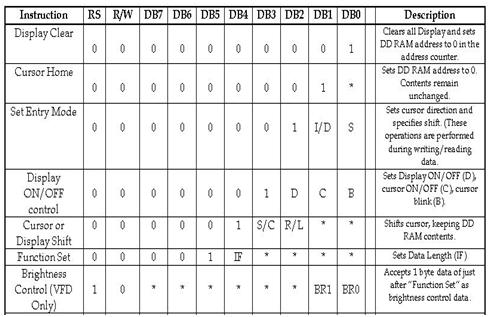
LCD instructions set for controlling the LCD display using microcontrollers
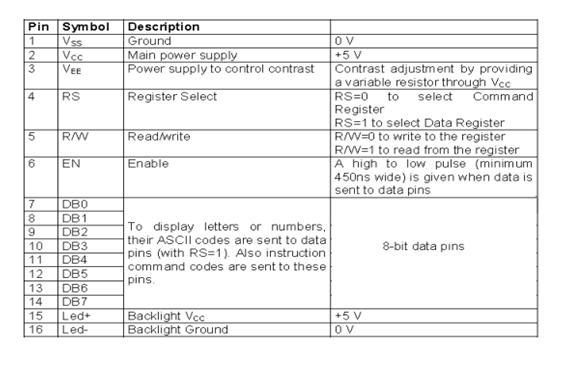
PIN description
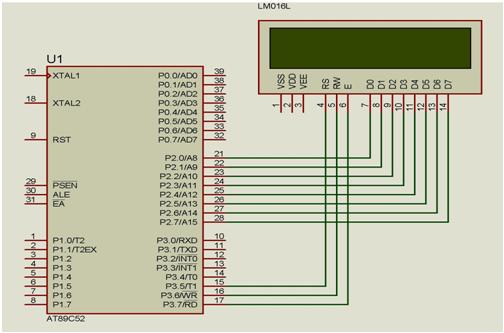
Interfacing 16x2 LCD display with 8051 microcontroller
In the above figure, 3 selected lines EN, R/W, RS will be used for controlling the LCD display. EN pin will be used for enabling the LCD display for communicating with microcontroller, RS with be used for register selection. When RS is set microcontroller will send instructions as data when RS is clear microcontroller will send the instructions as commands. For writing data RW should be 0 and for reading RW should be 1.
Conclusion:
This week I am going to learned about the LCD display as it is the one of the component which is used in my project. The type of LCD display and the application of of it need to take note so that it is suitable to use in this project. This project will used the 16x2 LCD display. The LCD display is used to display the location of the accident, the information whether the rider is drunken or not and display the motorcycle will start or not if the rider does not violated the rules when he or she wearing the helmet. This will help the rider to get a help in a very short time. Hence, lives can be save.
There are a number of alcohol sensors on the market. Police use them to estimate blood alcohol concentration (BAC) although this is more accurately determined through a blood test. Alcohol gas sensor detects the concentration of alcohol gas in the air and output its reading as an analog voltage. On the market there are different types of sensors to detect gas alcohol such as ethanol. There are five common families to detect the alcohol which are:
For this project, semiconductor sensor is chosen to detect the alcohol gas and the type that had be chosen is MQ-3 semiconductor sensor. Sensitive material of MQ-3 gas sensor is thin oxide (SnO2)
which with lower conductivity in clean air. When the target alcohol gas exist, the sensor's conductivity is more higher along with the gas concentration rising. The change of conductivity is converted to correspond output signal of gas concentration. MQ-3 gas sensor has high sensitivity to alcohol and has good resistance to disturb of gasoline, smoke and vapor. The sensor could be used to detect alcohol with different combustion, it is with low cost and suitable for different application.
Configuration
Features
Good sensitivity to alcohol gas
Long life and low cost
Simple drive circuit
Application
Vehicle alcohol detector
Portable alcohol detector
The alcohol sensor MQ-3 suitable for detecting alcohol concentration in breath like a common breathalyzer such as portable alcohol detection. It provides an analog resistive output based on alcohol concentration. The resistance of the sensor reduces when alcohol concentration increases. The sensor gives output as per the condition of the breath through the logic circuit which is sent to microporcessor. This power supply needs for this sensor is 5V.
MQ-3 ALCOHOL SENSOR CIRCUIT
PIN CONNECTION
MQ-3 ALCOHOL SENSOR
There are conditions that we need to follow so that the this alcohol function as we need. The conditions are:
Organic silicon steam cause invalid, sensors must be avoid exposing to silicon bond, silicon latex, putty or plastic contain silicon environment.
If the sensors exposed to high concentration corrosive gas, it will not only result in corrosion of sensors structure but also it cause sincere sensitivity attenuation.
The sensor performance will be change badly if sensors be sprayed polluted by alkali metals salt especially brine or be exposed to halogen such as fluorin.
Sensitivity of the sensors will be reduced when spattered or dipped in water.
Do avoid icing on sensor's surface otherwise sensor will lose sensitivity.
Applied voltage on sensor should not be higher than stipulated value otherwise it cause down-line or heater damaged and bring on sensors' sensitivity characteristic change badly.
In indoor conditions, slightly water condensation will effect sensors performance lightly. however, if water condensation on sensors surface and keep a certaion period, sensor sensitivity will be decreased.
The sensor resistance produce reversible drift if it's stored for long time without eectrify which drift related with storage conditions. sensors should be stored in airproof without silicon gel bag with clean air. for the sensors with long time storage but no electrify, they eed long aging time for stability before using.
Continual vibration will result in sensors down-lead response then repture.
If sensors meet strong concussion, it may lead its lead wire disconnected.
First test with MQ-3 Alcohol sensor
Conclusion:
This week I am going to learned about the alcohol sensor as it is the one of the component which is used in my project. The type of alcohol sensor and the application of of it need to take note so that it is suitable to use in this project. This project will used the MQ-3 alcohol sensor. The alcohol sensor sense the alcoholic content if the rider is drunken. If the driver is drunken, the LCD display will displayed to give information that the rider is drunken and the motorcycle cannot start. This will ensure safety of the rider because he or she cannot ride the motorcycle if he or she is drunken which will decrease the potential of the accident happens.